
If you’ve been looking at a new AI PC or AI Mini PC, you’ve probably noticed a new specification appearing alongside the familiar CPU and GPU: the NPU.
Modern AI PCs increasingly use three different types of processing hardware — the CPU, GPU and NPU — each designed to handle different kinds of workloads.
So, what exactly is an NPU, why does an AI computer need one, and does a more powerful NPU automatically mean a faster AI PC?
Here’s a simple explanation.
NPU stands for Neural Processing Unit.
It is a specialised processor designed to accelerate artificial intelligence and machine-learning workloads.
Traditional PCs have relied primarily on the CPU and GPU. An AI PC adds an NPU specifically designed to process certain AI workloads efficiently.
AMD describes its NPU as a dedicated AI engine designed for efficient AI processing, while Intel similarly positions the NPU as the part of an AI PC intended to handle sustained AI workloads with greater power efficiency.
Rather than making the CPU or GPU perform every AI operation, compatible software can send suitable workloads to the NPU.
This is particularly useful for AI features that need to run continuously in the background.
An easy way to understand an AI PC is to think of the CPU, GPU and NPU as three different specialists working together.
| Processor | Best suited for | Simple explanation |
|---|---|---|
| CPU | General computing | The all-rounder |
| GPU | Graphics and highly parallel workloads | The high-performance parallel processor |
| NPU | Efficient AI acceleration | The AI specialist |
An AI PC doesn’t necessarily replace one processor with another. Instead, workloads can be assigned to whichever processor is best suited to the task.
Intel describes current AI PCs as systems combining a CPU, GPU and NPU to process AI workloads locally and efficiently.
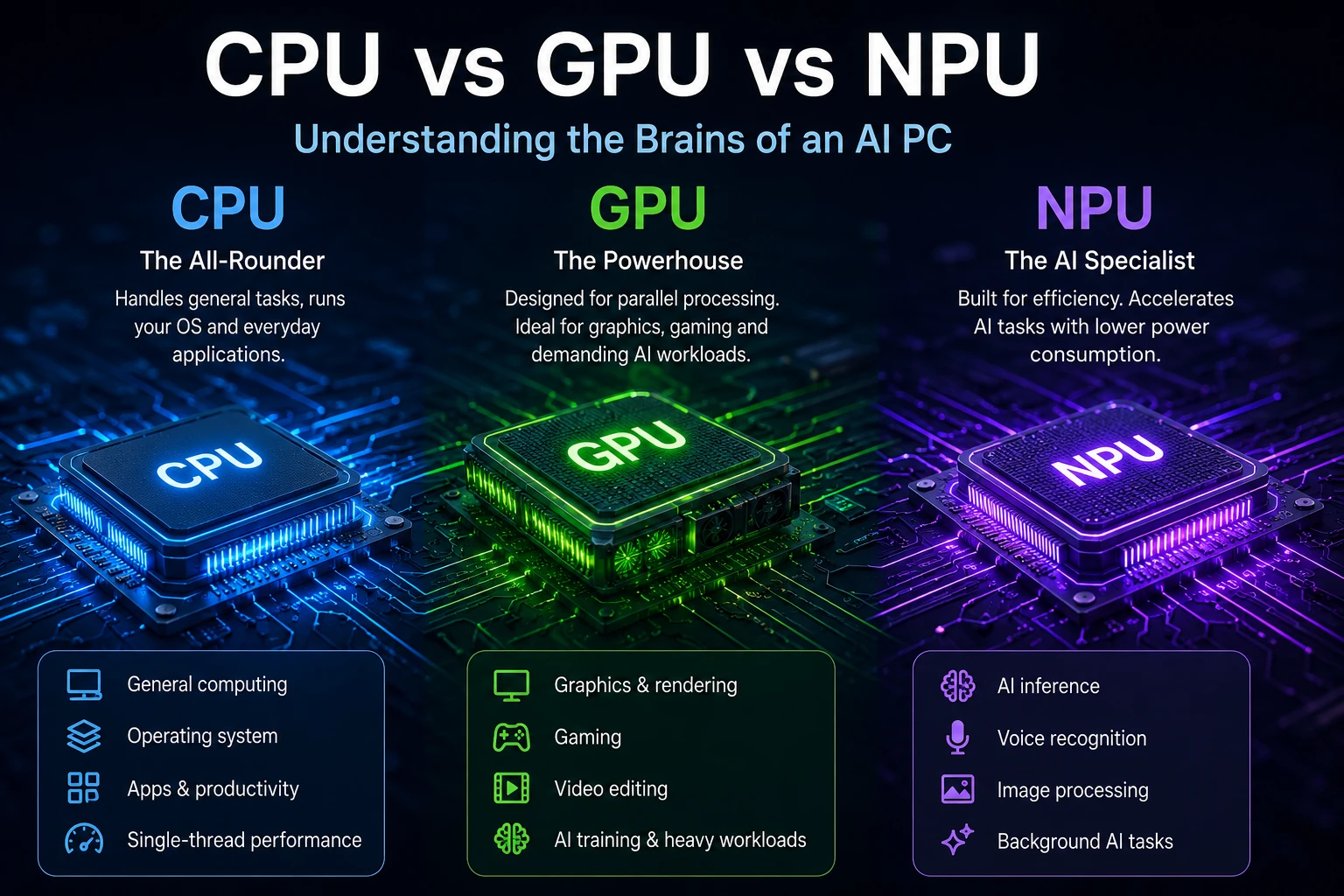
The Central Processing Unit (CPU) remains the main general-purpose processor in your computer.
It handles tasks such as:
CPUs are extremely flexible, but flexibility doesn’t necessarily make them the most efficient option for every AI workload.
The Graphics Processing Unit (GPU) was originally designed primarily for graphics, gaming and visual workloads.
GPUs contain many processing units capable of performing large numbers of calculations in parallel.
That capability has also made GPUs extremely important for AI.
Today, GPUs are widely used for demanding AI workloads including:
For heavy AI workloads, the GPU can still be one of the most important components in the computer.
This is why simply comparing the NPU specification of two AI PCs does not necessarily tell you which computer will be faster for every AI application.
We’ll cover GPUs for AI Mini PCs in more detail in an upcoming MegaTechStore guide.
The Neural Processing Unit is designed specifically around artificial intelligence workloads.
Its major advantage isn’t simply raw performance.
It is efficiency.
Certain AI operations that could otherwise occupy the CPU or GPU can instead run on dedicated AI hardware.
That can make an NPU particularly useful for persistent AI features such as:
The exact workloads that use the NPU depend on the software. Having an NPU does not mean every AI application will automatically run on it.
AI processing is increasingly moving directly onto personal computers.
Instead of sending every operation to a cloud server, some AI workloads can now be processed locally on the device.
An NPU provides dedicated hardware for these workloads.
This can offer several advantages.
An NPU can process supported AI workloads without requiring the CPU or GPU to operate at full load.
This is particularly valuable in laptops, Mini PCs and other compact computers where performance-per-watt matters.
Compatible AI applications can process information directly on the computer rather than relying entirely on cloud computing.
AMD highlights local inference, performance and privacy as major advantages of its current Ryzen AI platforms.
If the NPU takes responsibility for a suitable AI workload, the CPU and GPU can remain available for other applications.
For example, the GPU could continue handling graphics or another computational workload while the NPU processes a supported AI feature in the background.
NPU performance has also become an important part of Microsoft’s modern Windows PC platform.
Microsoft currently specifies an NPU capable of 40+ TOPS as one of the hardware requirements for a Copilot+ PC.
But what exactly is a TOP?
We’ll cover that separately in our What Does TOPS Mean in an AI PC? guide.
Generally, an NPU is now one of the defining hardware components associated with modern AI PCs.
But there is an important distinction:
Having an NPU doesn’t automatically make one computer better at every AI task than another.
AI performance can depend on many components, including:
This becomes particularly important when looking at powerful Mini PCs designed for local generative AI and large language models.
For some workloads, the GPU and available memory may matter considerably more than the NPU alone.
You can already see this CPU + GPU + NPU approach across the latest generation of MINIX AI Mini PCs.
For example, the MINIX ER937-AI uses the AMD Ryzen AI 9 HX 370 processor.
It combines:
MINIX currently supports up to 96GB DDR5 memory on the ER937-AI.
At the higher end, the MINIX ER939-AI Pro uses AMD’s Ryzen AI Max+ 395.
It combines:
This is a good example of why you shouldn’t choose an AI computer based purely on its NPU TOPS.
Both systems have a 50 TOPS NPU, but their overall architecture, GPU capabilities and memory configurations are very different.
Those differences can become extremely important for demanding local AI workloads.
No.
Although both can accelerate AI workloads, they are designed for different purposes.
A powerful GPU is generally suited to computationally intensive parallel workloads and remains extremely important for applications such as generative AI and large language models.
An NPU is designed to run supported neural-network and AI workloads efficiently.
In a modern AI PC, the more useful question isn’t necessarily:
“Which one is better?”
Instead, it’s:
“Which processor is best for this particular workload?”
The answer could be the CPU, GPU, NPU — or a combination of all three.
If you’re buying a new PC primarily for basic office work, web browsing and traditional applications, an NPU may not dramatically change how you use your computer today.
However, its importance is increasing as more software incorporates local AI functionality.
An NPU becomes more attractive if you’re buying a new system for:
For more demanding local AI applications, however, don’t look at the NPU in isolation.
You should also consider the GPU, RAM capacity, memory architecture and overall processor performance.
AI hardware is arriving at the same time that Mini PCs are becoming considerably more powerful.
Modern processors can now combine:
CPU + GPU + NPU
inside an extremely compact system.
That makes the latest generation of AI Mini PCs attractive for users who want powerful local computing without a traditional full-size desktop tower.
Higher-end platforms are taking this even further. AMD’s Ryzen AI Max architecture, for example, combines powerful CPU and GPU resources with an NPU and large amounts of unified memory for demanding local AI workloads.
We’ll explore why Mini PCs can be an excellent platform for local AI in another MegaTechStore guide.
If you only remember three things:
CPU = general computing
The CPU runs your computer and handles a huge variety of everyday processing tasks.
GPU = parallel performance
The GPU handles graphics and computationally intensive parallel workloads and can be extremely important for demanding AI applications.
NPU = efficient AI acceleration
The NPU is dedicated hardware designed to run supported AI workloads efficiently.
Modern AI computers increasingly use all three together.
And when you’re choosing an AI PC, don’t judge the system solely by the biggest AI number printed on the specification sheet. The CPU, GPU, NPU, memory and software support all contribute to what the computer can actually do.
MegaTechStore stocks and sources a growing range of MINIX and Minisforum AI Mini PCs, from compact everyday AI systems through to high-performance computers designed for demanding local AI workloads.
Explore our AI Mini PCs or contact MegaTechStore if you’re unsure which CPU, GPU, NPU or memory configuration is right for your workload.