
Next-Gen AI Performance Is Here – Pre-Order the New MINIX AI PC Today!
Artificial intelligence is changing what we expect from a personal computer.
AI processing is no longer limited to cloud services or large workstations. Modern processors now combine powerful CPUs, GPUs and dedicated AI accelerators, allowing more AI workloads to run directly on the computer.
At the same time, the traditional desktop tower is no longer the only way to get serious computing performance.
This combination has created a new category: the AI Mini PC.
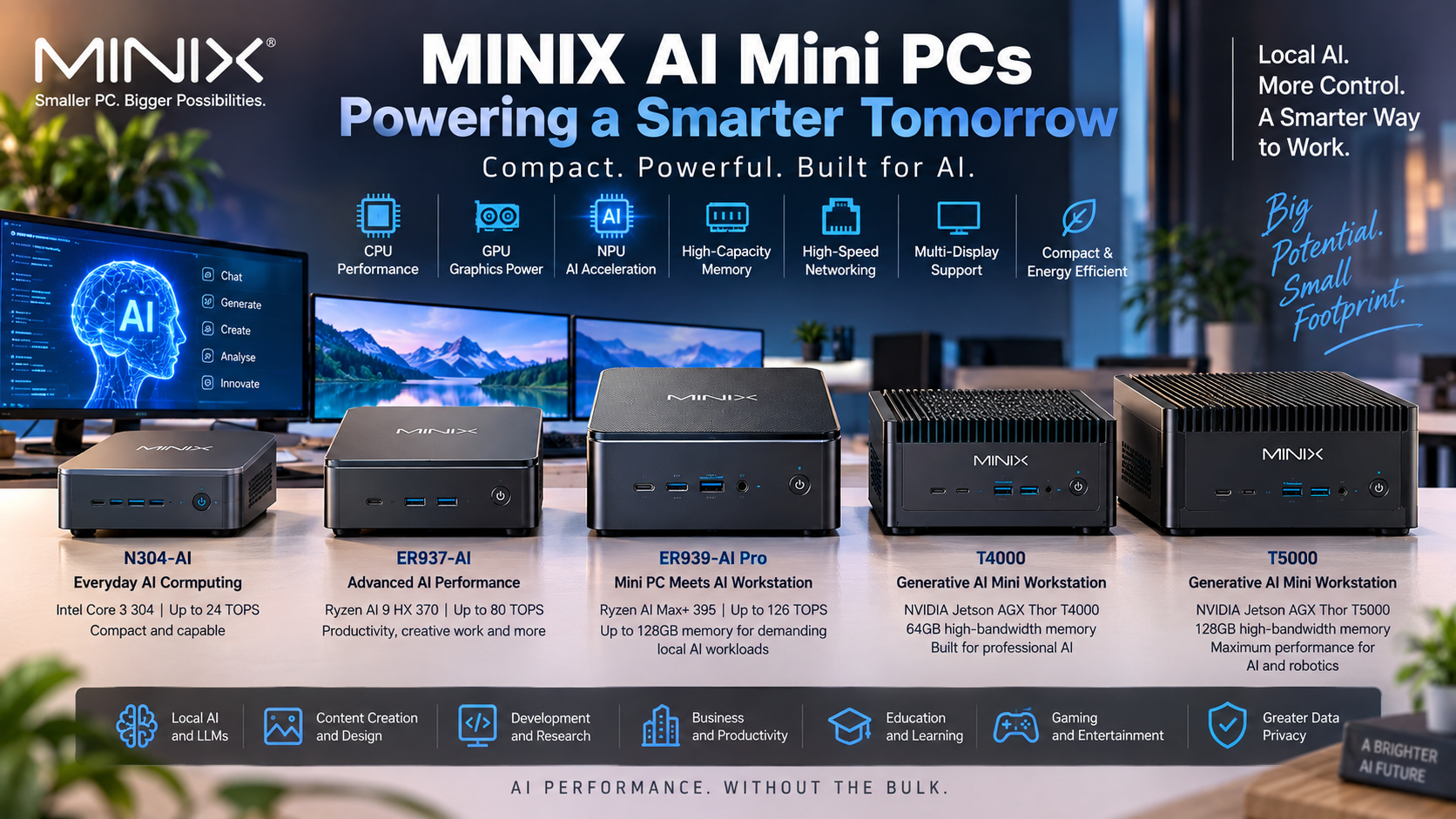
MINIX has expanded heavily into this space, with AI systems ranging from compact everyday computers such as the MINIX N304-AI, through powerful AMD Ryzen AI machines such as the ER937-AI and ER939-AI Pro, all the way to dedicated NVIDIA-powered generative AI workstations such as the T4000 and T5000.
So why would you choose a MINIX AI Mini PC instead of a traditional desktop or a cloud-only AI solution?
Let’s look at the practical advantages.
An AI Mini PC is a compact computer built around hardware capable of accelerating artificial intelligence workloads.
Modern AI PCs commonly combine three processing engines:
CPU — Central Processing Unit
Handles general computing, applications and operating-system tasks.
GPU — Graphics Processing Unit
Handles graphics and highly parallel computational workloads and can be particularly important for generative AI and local models.
NPU — Neural Processing Unit
A specialised processor designed to accelerate supported AI workloads efficiently.
Instead of depending entirely on one processor, modern software can use different parts of the system according to the workload.
This is one of the reasons current MINIX systems can provide considerably more AI capability than Mini PCs from only a few generations ago.
One of the biggest attractions of a MINIX AI Mini PC is straightforward:
Local AI means processing takes place on your own computer rather than requiring every request to be sent to a remote cloud server.
Depending on the software and model being used, this can provide benefits including:
Local processing can be particularly attractive for businesses working with internal documents or data, provided the software and workflow are configured so that information actually remains on the device.
And this is where MINIX’s product range becomes interesting.
There isn’t just one type of MINIX AI computer.
There are systems designed for very different levels of AI use.
Not everyone needs an extremely powerful AI workstation.
A business using AI-assisted Windows applications has very different requirements from a developer running large language models locally.
MINIX now covers several levels of the market.
At the more accessible end is the MINIX N304-AI.
It uses the Intel Core 3 Processor 304 and combines CPU, GPU and Intel AI Boost NPU resources for up to 24 TOPS of overall AI performance, including up to 15 TOPS from the NPU. It also includes 16GB LPDDR5X memory, NVMe storage and support for three 4K displays.
This makes it an interesting option for users who want a compact modern PC with dedicated AI acceleration without moving immediately into workstation-class hardware.
Potential environments include:
It demonstrates an important change in the PC market:
dedicated AI acceleration is no longer restricted to extremely expensive computers.
Users who need considerably more computing power can move into systems such as the MINIX ER937-AI.
The ER937-AI is powered by the AMD Ryzen AI 9 HX 370, combining:
MINIX also provides HDMI, DisplayPort and USB-C display outputs for multi-display environments.
MegaTechStore currently offers the ER937-AI with 32GB RAM, 1TB NVMe SSD and Windows 11 Pro.
View the MINIX ER937-AI at MegaTechStore
This type of system is better suited to buyers who want one compact computer capable of handling traditional productivity, content creation and increasingly demanding AI-assisted workloads.
Then there is the MINIX ER939-AI Pro.
This represents a very different class of Mini PC.
The ER939-AI Pro uses AMD’s Ryzen AI Max+ 395, with:
And MINIX fits that hardware into a chassis of approximately 2 litres.
This is where the distinction between an ordinary Mini PC and a mini workstation starts to become much more important.
MegaTechStore currently offers the MINIX ER939-AI Pro in configurations including 64GB and 128GB memory options.
View the MINIX ER939-AI Pro at MegaTechStore
When people compare AI PCs, they often look first at processor specifications or TOPS.
But for many local AI workloads, memory is equally important.
Large AI models can require substantial amounts of memory just to load their parameters.
That means the difference between:
16GB
32GB
64GB
and
128GB
can fundamentally change what you can comfortably run locally.
This is one of the most interesting aspects of the higher-end MINIX ER939-AI Pro.
Its Ryzen AI Max+ platform combines powerful Radeon 8060S graphics with up to 128GB LPDDR5X-8000 memory.
For users interested in large local models, generative AI, content creation or professional workloads, memory architecture can therefore be just as important as the headline AI-performance number.
We’ll cover this in more detail in our upcoming guide:
What Is Unified Memory and Why Does It Matter for AI?
Traditionally, anyone needing substantial graphics or parallel computing performance would expect to buy a desktop PC with a dedicated graphics card.
Modern AI processors are changing that.
The MINIX ER937-AI incorporates AMD Radeon 890M graphics, while the ER939-AI Pro steps up to the significantly larger Radeon 8060S integrated graphics architecture.
This allows MINIX to provide substantial GPU capability without installing a traditional desktop graphics card inside the machine.
That has several practical advantages:
A discrete GPU can still be the better choice for particular workloads, especially applications requiring specific NVIDIA CUDA capabilities or large amounts of dedicated VRAM.
But modern integrated GPU designs mean a Mini PC should no longer automatically be dismissed simply because it doesn’t contain a traditional graphics card.
MINIX’s approach to AI isn’t limited to Windows PCs powered by Intel and AMD.
At the high end, MINIX also offers the T4000 and T5000 Generative AI Mini Workstations, based on NVIDIA Jetson AGX Thor platforms using Blackwell GPU architecture.
These machines are specifically targeted at professional generative AI, local LLM inference, content creation, on-premise AI and development workloads.
MINIX specifies:
T4000
T5000
MINIX also lists support for NVIDIA’s CUDA, TensorRT, NIM and containerised AI software ecosystem.
MegaTechStore currently lists both the MINIX T4000 and T5000 in its AI PC range.
That gives MINIX an unusually broad AI lineup: from an everyday Windows AI Mini PC through to dedicated NVIDIA generative AI workstations.
One of the most discussed advantages of local AI is privacy.
But this needs to be explained carefully.
Simply owning an AI PC does not automatically make every AI application private.
If an application sends information to a cloud service, your data is still leaving the computer.
However, when models and software are specifically configured to operate locally, on-device processing can allow data to remain within the local system or organisation rather than sending every prompt or document to a third-party AI service.
This can be attractive for businesses working with:
The higher-performance T4000 and T5000 are specifically positioned by MINIX for local and on-premise AI deployment.
For organisations investigating private AI, this makes compact AI workstations particularly interesting.
AI capability isn’t the only benefit.
MINIX’s traditional strength is compact computing.
For example, the N304-AI measures approximately 127 × 126.8 × 46 mm, while even the much more powerful ER939-AI Pro occupies an approximately 2-litre enclosure.
This opens up installations that would be inconvenient with a traditional tower.
A Mini PC can work well for:
And because many MINIX systems support multiple displays, compact size doesn’t necessarily mean a limited desktop workspace.
AI workloads don’t exist in isolation.
Large models, datasets and media files can require significant storage and network bandwidth.
This is another area where higher-end MINIX machines begin to resemble professional workstations rather than ordinary Mini PCs.
The ER937-AI includes dual 2.5Gb Ethernet, while the ER939-AI Pro steps up to dual 10Gb Ethernet alongside Wi-Fi 7.
MINIX’s T4000 and T5000 AI workstations also provide dual 10GbE networking.
For businesses working with NAS systems, shared datasets, network storage or local AI infrastructure, that connectivity can be just as important as processor performance.
One of the advantages of the growing MINIX range is that you don’t necessarily have to buy the most expensive system.
The right AI PC depends on your workload.
Consider systems such as the MINIX N304-AI.
Suitable for general productivity and users wanting modern dedicated AI acceleration in an affordable compact PC.
The MINIX ER937-AI moves into a considerably higher performance class with Ryzen AI 9, Radeon 890M graphics and expandable DDR5 memory.
The MINIX ER939-AI Pro provides Ryzen AI Max+ 395 performance, Radeon 8060S graphics and up to 128GB LPDDR5X memory.
The MINIX T4000 and T5000 move into dedicated NVIDIA Blackwell-based platforms intended specifically for local generative AI and professional AI deployment.
This is why simply asking:
“What is the best AI PC?”
isn’t necessarily the right question.
A better question is:
The strongest argument for MINIX isn’t one individual specification.
It’s the combination of:
Compact design
High-performance computing without a traditional desktop tower.
Dedicated AI hardware
Current MINIX AI systems use modern Intel, AMD and NVIDIA AI platforms.
Different performance levels
Options range from everyday AI PCs to professional generative AI workstations.
Powerful graphics options
Including Radeon 890M, Radeon 8060S and NVIDIA Blackwell-based systems.
Large memory configurations
Higher-end models are available with up to 128GB memory.
Modern connectivity
USB4, Wi-Fi 7 and high-speed Ethernet are available on selected systems.
Local AI capability
Suitable models can run supported AI applications and models directly on the device rather than relying entirely on cloud computing.
Most importantly, you can choose a system appropriate for your workload rather than automatically moving to a large desktop workstation.
MegaTechStore offers a growing range of MINIX AI Mini PCs and AI workstations in Australia, from compact everyday systems through to high-performance Ryzen AI and NVIDIA generative AI platforms.
Explore AI PCs at MegaTechStore
If you’re comparing MINIX systems, don’t look only at the processor name or TOPS figure.
Consider:
CPU performance
GPU performance
NPU capability
RAM capacity
memory architecture
storage
networking
software compatibility
and, most importantly, the AI applications you actually intend to use.
The right Mini PC could be anything from the compact MINIX N304-AI to the ER937-AI, the 128GB ER939-AI Pro or a dedicated NVIDIA-powered T4000/T5000 workstation.
The advantage is that AI computing no longer necessarily requires a large desktop computer.
For many workloads, it can now fit comfortably on your desk.
Next in the MegaTechStore MINIX AI series: MINIX ER939-AI Pro — Why 128GB Unified Memory Matters for Local AI.