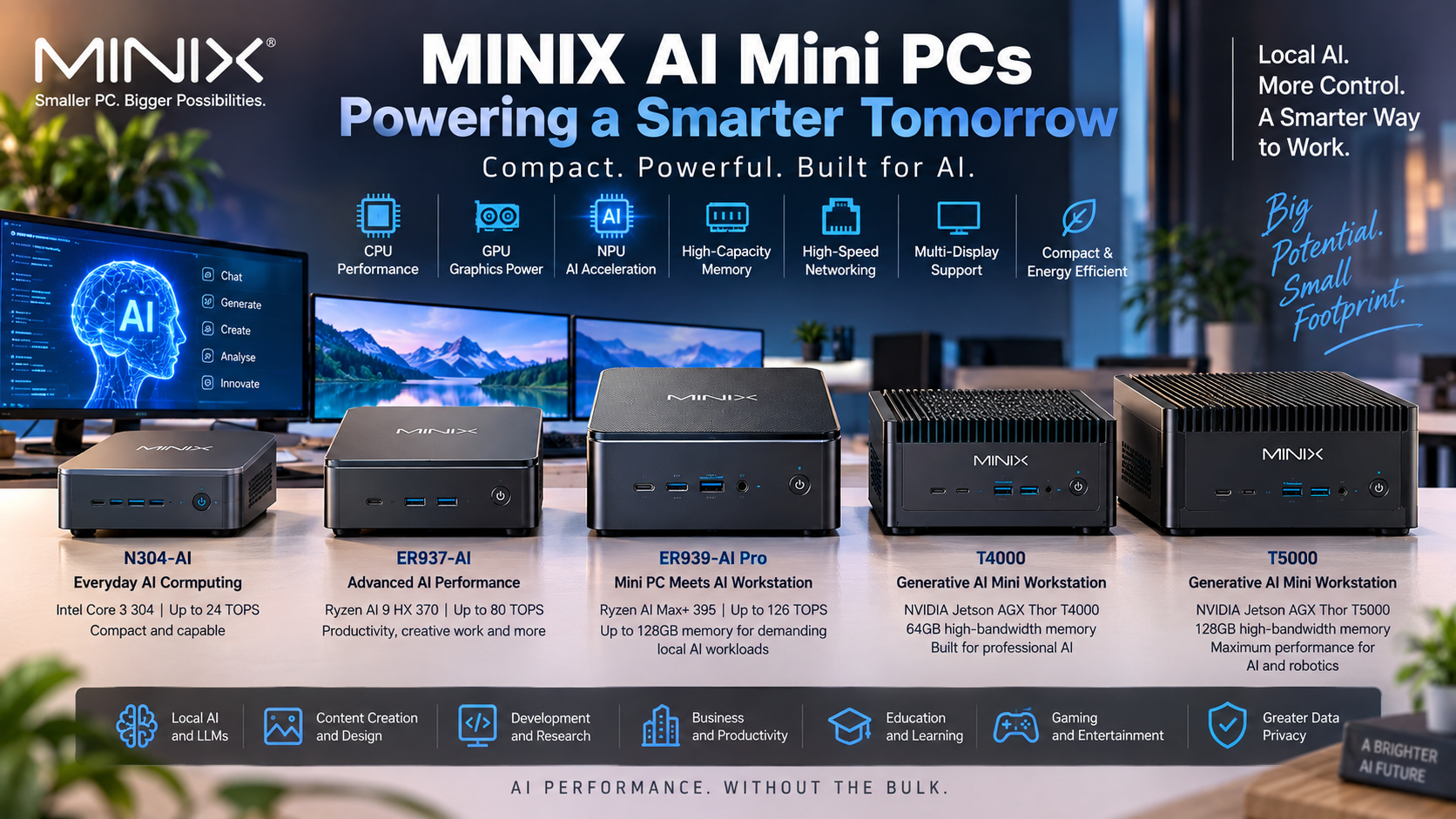

The Minix ER 939 AI Pro is aimed at users who want much more from a compact computer than everyday office work. With an AMD Ryzen AI Max+ 395 processor, Radeon 8060S graphics, a dedicated Ryzen AI NPU and configurations with up to 128GB of high-speed memory, it is positioned as a compact AI workstation rather than a basic mini PC. For Australian buyers considering local AI, the important question is not simply whether the system has an NPU, but whether its overall hardware suits the models, applications and workflows they actually plan to run.
Local AI can reduce reliance on cloud processing for supported workloads, but performance still depends on software compatibility, model size, memory requirements and whether an application can make effective use of the CPU, GPU or NPU. That makes it worth looking beyond headline TOPS figures before deciding whether this system is appropriate.
The Minix ER 939 AI Pro sits in a different category from the small computers typically used for web browsing, productivity and light office applications. Its hardware is designed to support demanding professional workloads while retaining a compact footprint.
According to its current Australian product listing, the system combines a 16-core, 32-thread AMD Ryzen AI Max+ 395 processor with Radeon 8060S graphics, dedicated Ryzen AI acceleration, fast NVMe storage and high-capacity LPDDR5X memory.
The Minix ER 939 AI Pro has an NPU rated at up to 50 TOPS, while its overall AI processing capability is listed at up to 126 TOPS. Those figures indicate that the machine has dedicated hardware for AI processing rather than relying entirely on conventional CPU resources.
For users interested in local AI, the broader architecture matters just as much. The Radeon 8060S GPU and large memory configuration can be particularly relevant for workloads that do not run primarily on the NPU.
In practice, this means the machine is better viewed as a compact workstation with multiple processing resources rather than simply an NPU-equipped mini PC.
A typical mini PC may be designed for office applications, media playback and general productivity. The Minix ER 939 AI Pro is built around considerably more powerful hardware and is currently offered in Australia in 64GB and 128GB memory configurations.
That distinction becomes important when working with large datasets, multiple demanding applications or supported local AI models.
However, more hardware does not automatically make every AI task faster. Software support still determines whether an application can efficiently use the NPU, GPU or CPU.
AI performance is often reduced to a single TOPS figure, but that can oversimplify what users actually experience.
The Minix ER 939 AI Pro combines several types of compute hardware, each suited to different tasks. Understanding that distinction can make it easier to judge whether the machine fits a particular local AI workflow.
The dedicated Ryzen AI NPU is rated at up to 50 TOPS, while MINIX lists total AI performance of up to 126 TOPS.
An NPU is designed to accelerate supported AI tasks efficiently. However, not every local AI application will automatically run primarily on the NPU. Some workloads may rely more heavily on the Radeon GPU, while others can still use CPU resources.
This is why buyers should check compatibility with the specific software they intend to use rather than judging the Minix ER 939 AI Pro by TOPS alone.
Local AI can include tasks such as supported language-model inference, image processing, coding assistance, document analysis and AI-enabled professional applications.
The main advantage is that supported workloads can potentially run directly on the computer rather than sending every task to a remote cloud platform. This can be useful when internet connectivity is limited, latency matters or users want more control over where certain data is processed.
The actual experience will vary considerably between applications and AI models, so it is sensible to confirm software requirements before buying.
Memory can become one of the most important constraints when running demanding AI workloads locally.
The Minix ER 939 AI Pro is available with up to 128GB of LPDDR5X memory, giving it considerably more capacity than many standard compact PCs. The Australian product listing specifies 128GB LPDDR5X-8000 memory for the higher configuration.
Large AI models require significant memory to load model weights and process data. Having more memory can therefore expand the range of workloads that can run locally, although model compatibility and software optimisation remain important.
The Minix ER 939 AI Pro also uses integrated Radeon 8060S graphics, so the system architecture differs from a traditional workstation fitted with a discrete graphics card and its own dedicated VRAM.
For buyers considering local AI, that makes total available memory a particularly important specification to examine.
A smaller mini PC with 16GB or 32GB of RAM may be perfectly suitable for office work, browsing, productivity and lighter AI-assisted applications.
The Minix ER 939 AI Pro’s 64GB and 128GB configurations provide substantially more headroom for larger workloads, heavy multitasking and applications that require significant memory.
That does not mean everyone needs 128GB. Buyers should first identify the models and applications they expect to run. Paying for unused memory offers little practical benefit if the workload is relatively light.
The Minix ER 939 AI Pro makes local AI more practical, but local processing and cloud AI are not mutually exclusive.
Many businesses and professionals are likely to use a combination of both, choosing local processing for some tasks while continuing to use cloud platforms for others.
Running supported AI workloads locally can reduce dependence on a continuous internet connection and may reduce the need to send some information to a third-party cloud service.
It can also be useful where fast response times are important or where users want direct control over their own AI environment.
With its dedicated NPU, Radeon graphics and high-capacity memory, the Minix ER 939 AI Pro provides hardware designed to make these types of local workloads more practical than they would be on a basic mini PC.
Privacy should still be assessed at the software and workflow level. Running an application on local hardware does not automatically guarantee that it never communicates with an external service.
Some AI models and services require computing resources far beyond what a single workstation can reasonably provide.
Cloud platforms may also offer access to proprietary models, scalable infrastructure or specialised services that cannot simply be reproduced locally.
For that reason, the Minix ER 939 AI Pro should not be viewed as a replacement for every cloud AI service. Its value is in giving users another option: running compatible workloads locally when that approach suits their requirements.

Local AI performance is only part of the workstation equation. Developers, content creators and technical professionals often need fast storage, networking and external connectivity as well.
The Minix ER 939 AI Pro is well equipped in these areas, which is one reason it is better described as a mini workstation than an ordinary mini PC.
The current specification includes two 10Gb Ethernet ports, Wi-Fi 7, Bluetooth 5.4 and two USB4 ports capable of up to 40Gbps. It also provides HDMI 2.1 and DisplayPort 1.4 connections.
Those connections can be useful in professional environments involving network-attached storage, large file transfers, high-resolution displays and fast external devices.
The USB4 connections also support display output, with MINIX listing support for up to 8K at 60Hz through those ports.
The Australian 128GB configuration is listed with a 2TB PCIe 4.0 NVMe SSD. The specification also lists three M.2 2280 PCIe 4.0 x4 NVMe slots.
Fast storage can matter for local AI because models, datasets, video files and project assets can consume large amounts of space.
Users planning substantial local model libraries should therefore consider storage requirements alongside processor and memory performance. This is also where buyers comparing mini PC parts and conventional desktop upgrades should pay attention to the difference between replaceable storage and integrated components.
The Minix ER 939 AI Pro is not the only compact system aimed at advanced users, so comparison shopping is worthwhile.
However, specifications need to be compared in context. A workstation mini PC, a NAS-oriented device and a conventional pre build PC may target quite different workloads even if their processors appear similar.
Buyers researching Minisforum Australia products may come across the Minisforum N5 Pro. The current N5 Pro specification uses the AMD Ryzen AI 9 HX PRO 370 with 12 cores and 24 threads, Radeon 890M graphics, an NPU rated at up to 50 TOPS and support for up to 96GB of DDR5 ECC memory.
The N5 Pro is primarily designed as an AI-capable NAS, with multiple drive bays and storage-focused features. That makes its intended use quite different from the Minix ER 939 AI Pro, which is positioned as a compact desktop AI workstation.
Minisforum also offers higher-end systems using the Ryzen AI Max+ 395, so buyers comparing Minisforum PCs should pay close attention to the exact model rather than comparing brands alone.
A conventional pre build PC can offer advantages when component replacement and future upgrades are priorities.
Desktop towers commonly provide more room for discrete graphics cards, additional cooling hardware and replaceable memory. The trade-off is usually a much larger physical footprint.
The Minix ER 939 AI Pro measures approximately 205 × 192 × 70mm and weighs about 1.4kg, making it considerably more compact than a traditional tower workstation.
The key question is therefore not which format is universally better, but whether compactness, integrated high-capacity memory and built-in connectivity are more important than maximum component flexibility.
The Minix ER 939 AI Pro makes the most sense when its higher-end hardware will actually be used.
Someone buying a computer primarily for email, web browsing and basic office applications would be unlikely to benefit fully from 128GB of memory or a Ryzen AI Max+ processor. Users running demanding development, creative or AI workloads have a stronger reason to consider it.
Developers experimenting with supported local AI models may benefit from the combination of CPU, GPU, NPU and large memory capacity.
Content creators may also find the Radeon 8060S graphics, fast storage, multi-display connectivity and high-speed networking useful for workloads extending beyond AI alone.
For Australian buyers, Mega Tech Store currently lists the MINIX Elite ER939 AI Pro with 64GB and 128GB configurations and identifies itself as a Sydney-based supplier serving customers across Australia.
This gives buyers a local option for checking current configurations, pricing and availability rather than relying entirely on overseas listings.
The best way to judge the Minix ER 939 AI Pro is to start with the software rather than the specification sheet.
Check which AI applications you intend to run, whether they support AMD hardware, how much memory the models require, what storage capacity you need and whether the software can use the NPU or Radeon graphics effectively.
If your workload genuinely benefits from large memory, powerful integrated graphics, fast networking and local AI acceleration, this system offers an unusually capable set of hardware in a compact form. For lighter workloads, a lower-spec mini PC may provide better value.
Australian buyers considering the system can review the currently available configurations through Mega Tech Store and compare them with other AI mini PCs before deciding. The goal should be to choose hardware that fits the applications you actually intend to use rather than simply buying the system with the highest headline specification.